
.png)
Description
Download AISEO Slogan Generator – Free AI‑Powered Tagline Creator for Brands
Overview
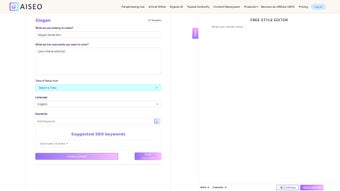
AISEO Slogan Generator is a cloud‑based, AI‑driven tool that helps businesses, marketers, freelancers, and content creators produce memorable, SEO‑friendly taglines in a matter of seconds. The service works entirely in the browser, which means there is no need to download or install any additional software. Users simply type a brief description of their brand, product, or service, choose a language and desired length, and the algorithm returns a curated list of slogan options that balance creativity with search‑engine relevance. The platform currently supports 25 languages, ranging from English and Spanish to Japanese, Russian, and Arabic, allowing global brands to maintain consistent messaging across diverse markets. Because the engine is trained on millions of high‑performing slogans, the output respects proven copywriting principles while remaining original enough to avoid duplication penalties. In addition to raw slogan generation, AISEO also suggests related marketing concepts such as call‑to‑action phrases, brand positioning statements, and short value propositions. This makes the tool a versatile companion for logo design, ad copy, landing page headlines, and even social‑media bios. The free tier offers unlimited slogan generation, positioning AISEO Slogan Generator as a cost‑effective alternative to hiring professional copywriters or purchasing expensive SaaS solutions. Security is built‑in, with HTTPS encryption protecting all user inputs, and no personal data is retained beyond the active session unless the user opts to create a free account for saving favorites. Overall, AISEO Slogan Generator aims to streamline the creative process, improve brand recall, and boost click‑through rates by delivering instantly actionable, keyword‑rich taglines that resonate with target audiences.
Key Features & Benefits
- Completely free, unlimited slogan generation with no hidden fees.
- Support for 25 languages, enabling multilingual branding campaigns.
- Three slogan length options: short (3‑5 words), medium (6‑10 words), long (11‑15 words).
- SEO‑optimized output that naturally incorporates target keywords.
- Industry‑specific templates for e‑commerce, SaaS, health, finance, and more.
- Instant results – suggestions appear within seconds after input.
- Additional marketing concept suggestions, including CTA ideas and positioning statements.
- Responsive design works seamlessly on desktop, tablet, and mobile browsers.
- Secure HTTPS connection and no data retention without user consent.
- Automatic AI model updates keep the language fresh and trend‑aware.
Why These Features Matter
The free‑forever model removes financial barriers for startups and small businesses that often cannot afford dedicated copywriters. Multilingual support expands the reach of campaigns, allowing brands to tailor messages for regional audiences without hiring separate translators. Offering three distinct length categories gives marketers flexibility: a concise, punchy tagline works well on a logo or app icon, while a longer, descriptive version can enrich landing‑page headlines or email subject lines. The built‑in SEO orientation ensures that each suggestion aligns with keyword strategies, potentially improving organic rankings and click‑through rates. Industry‑specific templates reduce the time spent brainstorming by providing context‑aware prompts that reflect common terminology and customer expectations within a sector. Because the tool runs in the cloud, users benefit from instant updates to the AI model, meaning the generated slogans stay current with evolving language trends and popular buzzwords. The responsive interface guarantees a smooth experience whether you are drafting ideas in a boardroom, a coffee shop, or on the go from a smartphone. Finally, the emphasis on security and privacy builds trust, especially for users who may be inputting proprietary product details. Collectively, these features transform AISEO Slogan Generator into a versatile, low‑risk, high‑reward asset for any brand looking to sharpen its messaging quickly and cost‑effectively.
Installation, Compatibility & Security
Step‑by‑Step Usage Guide
Because AISEO Slogan Generator is a web‑based service, there is no traditional installation process. Follow these steps to start creating slogans right away:
- Open a modern web browser (Chrome, Firefox, Safari, Edge, or Opera) on any device.
- Navigate to the official URL: https://aiseo.com/slogan-generator.
- Enter a concise description of your brand, product, or service in the main input field. Include any relevant industry keywords or target‑audience details to guide the AI.
- Select the preferred language from the drop‑down menu. For bilingual campaigns, repeat the process with the second language.
- Choose the desired slogan length (short, medium, or long) using the radio buttons.
- Click the “Generate Slogans” button. Within a few seconds, a list of 10‑15 tailored taglines will appear.
- Review the suggestions, copy your favorites, and paste them into your marketing assets. If none of the options fit, click “Regenerate” for a fresh batch.
- (Optional) Create a free account to save favorite slogans in a personal library for future reference.
Operating System & Browser Compatibility
AISEO Slogan Generator works on any operating system that can run a contemporary web browser, including Windows 10/11, macOS Monterey and later, popular Linux distributions, iOS 13+ and Android 8+. The service does not require any plugins, extensions, or additional runtimes, making it instantly accessible on laptops, desktops, tablets, and smartphones. Because all processing occurs on secure cloud servers, there is no offline mode; an active internet connection is required. The interface is lightweight and optimized for low‑bandwidth environments, though a stable connection will provide the best experience. Accessibility standards (WCAG 2.1 AA) are observed, ensuring that users with visual impairments can navigate the tool using screen readers and keyboard shortcuts.
Security, Privacy & Automatic Updates
The platform uses HTTPS encryption to protect every piece of data transmitted between the user’s device and the server. No personal information is stored beyond the active session unless the user explicitly creates an account to save slogans. AISEO does not sell or share user inputs with third parties. Behind the scenes, the AI model is continuously refined; updates are deployed automatically, so users always benefit from the latest linguistic patterns, trending keywords, and improved generation quality without needing to reload or reinstall anything. Regular security audits and compliance checks further reinforce the tool’s reliability for professional use.
Pros, Cons & Frequently Asked Questions
Pros
- Fully free with unlimited slogan generation.
- Supports 25 languages for global reach.
- SEO‑friendly output that boosts organic visibility.
- Three length options adapt to different branding touchpoints.
- Industry‑specific templates speed up creative brainstorming.
- Instant, cloud‑based results – no installation required.
- Responsive design works across all devices.
- Secure HTTPS connection and privacy‑first data handling.
- Automatic AI model updates keep suggestions current.
Cons
- Requires an internet connection; no offline mode.
- Customization options beyond language and length are limited (e.g., tone selection is basic).
- Does not offer direct social‑media publishing integration.
- Template library, while useful, could be expanded for niche industries.
- Advanced analytics or performance tracking are not included.
FAQ
Is AISEO Slogan Generator really free?
Yes, the core slogan generation feature is completely free. There are no subscription fees or hidden charges for creating unlimited slogans.
Can I use the generated slogans for commercial purposes?
Absolutely. All slogans produced by AISEO are owned by the user, allowing unrestricted commercial use, including branding, advertising, and product packaging.
How many languages does the tool support?
The generator currently supports 25 languages, ranging from English and Spanish to Japanese, Russian, and Arabic, making it suitable for multinational campaigns.
Do I need to create an account to save slogans?
No account is required for generating or copying slogans. However, creating a free account allows you to save favorite taglines in a personal library for future reference.
Is there any limit to the number of slogans I can generate per day?
The free version imposes no daily limit. Users can generate as many slogans as needed, though excessive automated requests may be throttled to protect server performance.
Review Summary
Pros: Free, multilingual, SEO‑oriented, instant results, responsive design.
Cons: No offline mode, limited deep customization, lacks direct social‑media push.
Conclusion & Call to Action
AISEO Slogan Generator stands out as a cost‑effective, user‑friendly solution for anyone looking to craft memorable, SEO‑ready taglines without the expense of hiring a professional copywriter. Its AI engine delivers diverse suggestions in seconds, while multilingual support ensures that brands can speak directly to audiences around the world. The free tier removes financial friction, making the tool especially attractive to startups, freelancers, and small marketing teams. Although power users may miss offline access and deeper tone controls, the overall value proposition—speed, ease of use, and built‑in SEO optimization—makes it a compelling addition to any marketer’s toolkit. If you need a fresh, catchy slogan today, simply visit the AISEO website, enter a brief description, and let the AI do the heavy lifting. Start building stronger brand identity now, and watch your click‑through rates climb.
Download AISEO Slogan Generator and generate your first free slogan in under a minute.
Guides & Tutorials for AISEO Slogan Generator
How to install AISEO Slogan Generator
- Click the Preview / Download button above.
- Once redirected, accept the terms and click Install.
- Wait for the AISEO Slogan Generator download to finish on your device.
How to use AISEO Slogan Generator
This software is primarily used for its core features described above. Open the app after installation to explore its capabilities.
User Reviews for AISEO Slogan Generator 0
No reviews found




